
Every detection system eventually needs a way for a human to say this is fine.
In most security tooling, that’s simple. The thing being flagged is a filename, a hash, or a rule name. You store it and skip anything that matches. Nobody writes articles about it.
I work on Logster, a threat detection platform for Windows and Linux that doesn’t flag individual strings. It looks at how activity on an endpoint connects: which process started which, what it touched, where it connected. Detection reasons over that behaviour as a whole.
So when an analyst reviews a flagged piece of activity and decides it’s a nightly backup job, what they’re approving isn’t a filename. It’s a pattern of behaviour.
Building “trust this pattern” turned out to be a harder and more interesting problem than we expected. Here’s what we learned, including the part that went wrong.
“The same activity” is never the same data
The obvious approach is to save what the analyst approved and compare future activity against it. That fails immediately, because running identical activity twice never produces identical data.
- Process IDs change every run.
- Temp file names and timestamps change.
- The approved activity turns up in a different context. The backup script that ran under one parent process on Monday runs under another on Tuesday.
- Observation boundaries fall differently. Activity that’s captured in one piece today might be split across two slices tomorrow.
Exact equality is useless here. What you actually need is equivalence, plus a definition of equivalence the analyst gets to control.
Two definitions of “the same”
We ended up giving analysts two ways to approve a pattern, because there’s no single right answer.
Strict matches the specific action. The same command lines, the same file paths, the same destinations. Volatile details like process IDs are ignored, but the substance has to match.
Shape matches the kind of activity. A command shell starting a system utility that queries the network looks the same under shape matching whichever utility it is and wherever it connects.
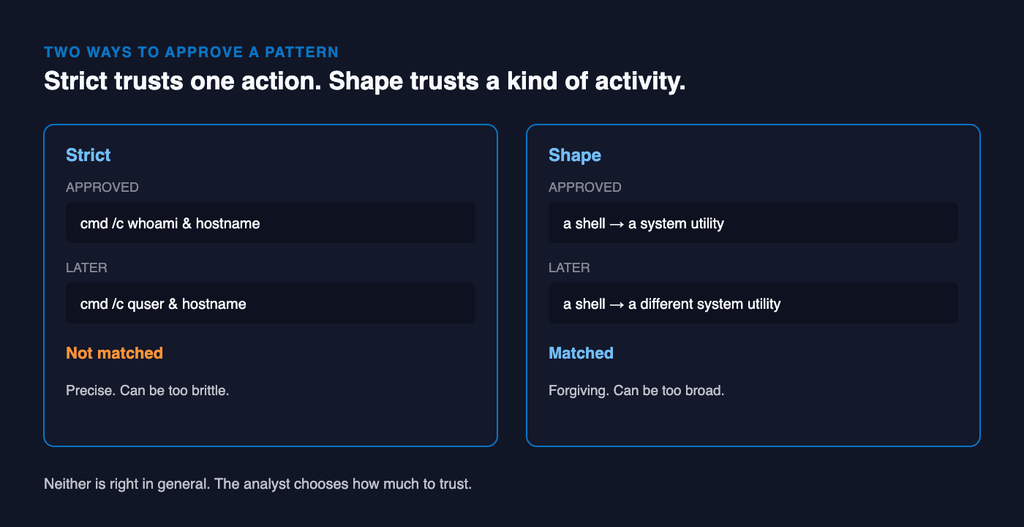
In practice:
Approved with strict:  cmd /c whoami & hostname
Later:                 cmd /c quser & hostname        not matched
Approved with shape: a shell starting a system utility
Later: a shell starting a different system utility matchedThat’s the central trade-off of the whole feature:
Shape is forgiving and can be too broad. Strict is precise and can be too brittle.
Hold onto that. It’s the part that matters most for safety, and we’ll come back to it.
Matching has to be cheap
Once approvals are patterns rather than strings, the question becomes: does this approved pattern appear anywhere in the activity I’m looking at right now?
Asked naively, that’s an expensive question. It gets asked constantly, across every endpoint, against every approval anyone has ever saved. So a large part of the engineering was making that comparison fast enough to sit directly in the detection path without slowing detection down.
The design principle we settled on is one I’d recommend to anyone:
Summarise where you can, search where you must.
Most approved patterns can be reduced to a compact summary, so recognising them later is effectively a lookup. The harder case is a small approved action that recurs buried inside a larger, different-looking chain of activity each time. That case needs an actual search, and we keep it affordable by limiting it to small patterns, where searching is fast.
The bug: our patterns remembered how we saw the activity
This is the part I’d most want someone building something similar to read.
Endpoint activity gets observed in slices of time. Sometimes a process’s parent started before the slice began, so inside that slice the parent’s identity isn’t fully known. Sometimes the parent started inside the slice and is fully visible.
Same activity. Different picture, depending entirely on where the slice happened to start.
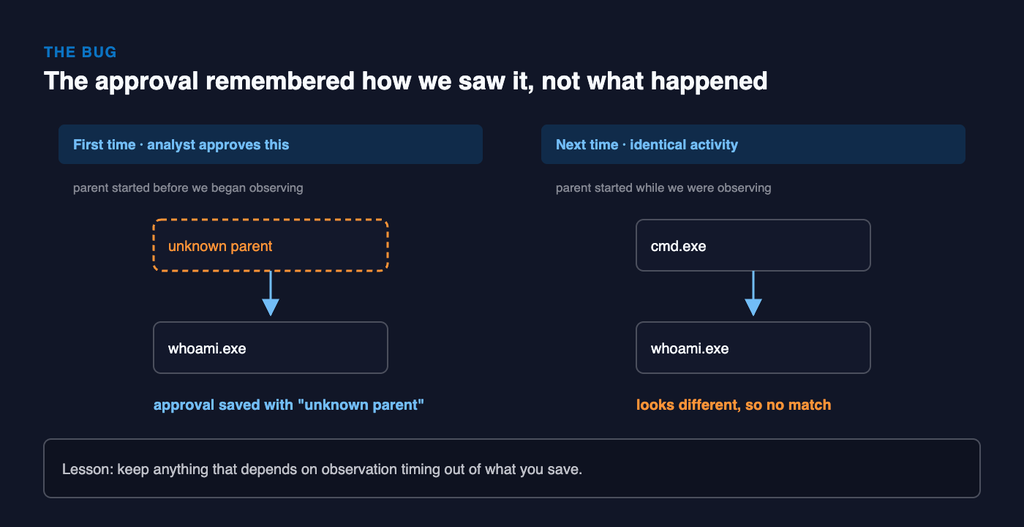
Here’s how that broke. An analyst approved a benign chain from a slice where the parent was unknown. The saved pattern included that “unknown parent”. The next time the same activity ran, the parent was fully visible, the pattern no longer matched, and the approval silently did nothing.
No error and no warning. The analyst had approved something and it kept getting flagged, intermittently, in a way that looked random. That’s the worst kind of bug in security tooling, because it wears away trust in the product without ever announcing itself.
The fix was to make sure nothing that depends on observation timing ever becomes part of a saved pattern.
The lesson generalises well beyond whitelisting:
Anything in a fingerprint that describes how you observed something, rather than what actually happened, will make matching flaky.
Time boundaries, sampling decisions, collection order, agent versions. If it can differ between two observations of identical activity, keep it out of the fingerprint.
A design hazard: forgiving matches need meaningful categories
This one wasn’t a bug we shipped, but it shaped the design more than anything else.
Shape matching depends on grouping things into sensible categories: shells, system utilities, scripting hosts, and so on. It’s only as safe as those categories are meaningful.
Imagine a platform where most processes don’t fit any category and all get lumped into “other”. Now every process looks the same to shape matching. “Trust this backup script” quietly becomes “trust anything with the same rough outline”, which on that platform is nearly everything.
That’s why categories have to be defined properly for every platform you support, not carried over from the first one you built for.
The broader point:
In any forgiving match mode, the categories are the security boundary. If one category ends up holding most of your data, “match the shape” silently means “match everything.”
Approvals must never be silent
When activity matches an approval, Logster stops it from being flagged. We were deliberate about what else happens.
- The approval is visible. Anything affected shows that an approval was applied, and which one.
- Every approval records who created it and why. A year later, someone can still answer “why is this trusted?”
- Approvals can be disabled rather than deleted. Trust can be withdrawn without losing the history.
A whitelist entry is a statement of trust made by a specific person for a specific reason. If you can’t audit that statement later, you haven’t built a whitelist. You’ve built a blind spot.
The trade-offs that remain
Some of these are fixable. Some are built into the problem.
- Shape can be too broad. A very generic pattern, like any shell starting any other shell, is common enough to hide real activity. Our guidance is to prefer strict, or a more specific pattern.
- Strict can be too brittle. A slightly different command line doesn’t match, and analysts may need several approvals for one logical activity.
- Scope is a real decision. Something benign on a build server might be suspicious on a domain controller.
- Approvals apply going forward. They don’t rewrite past verdicts.
None of these has a clean universal answer. They are the real design space of the feature. A vendor who tells you their allowlisting involves no trade-offs hasn’t looked closely at it.
If you’re building or buying something like this
Building:
- Decide what “the same” means before writing any matching code, and offer more than one definition.
- Summarise where you can, search where you must.
- Audit your fingerprints for anything that depends on how you observed the activity.
- Check your categories on every platform. If one bucket dominates, your forgiving mode is matching everything.
- Make every approval visible and attributable.
Buying:
- Ask what exactly a whitelist entry matches on: a name, a rule, or a behaviour.
- Ask whether you can choose how precise the match is.
- Ask whether you can see, for any alert that didn’t fire, which approval suppressed it.
- Whitelist three real false positives during your trial, then check nothing else was silenced along with them.
Logster is a threat detection platform for Windows and Linux that detects attacks from the behaviour of endpoint activity. More at logster.ai.